



Visitor management
Know who is on site.
Visitors included.
Visitors check themselves in at a kiosk on any tablet or laptop. Their host is emailed, they agree to your site rules, and they appear on your live list and fire roll call until they check out. It all runs inside ClockRite Cloud, alongside your staff.
A ClockRite Cloud module · No app for visitors to download · UK hosted
- PSPriya ShahInterview with HRInterviewHost: Sophie Mills
- LCLee CarterCity CouriersDeliveryHost: Goods in
- DHDan HughesHughes ElectricalContractorHost: Mo Ahmed
What you get
A modern replacement for the visitor book
The Visitor Management module adds a self-service reception to ClockRite Cloud. Every visitor, contractor and delivery is recorded with the reason for their visit, and you can see who is on site at any moment.
A kiosk on any tablet or laptop
The kiosk runs in a web browser, so there is no specialist hardware to buy and nothing for visitors to download.
Staff and visitors in one live view
See everyone on site right now. Each visitor is marked by visit type, so you can tell them apart from employees at a glance.
Hosts emailed on arrival
When a visitor checks in, the person they are visiting gets an email straight away, so nobody is left waiting at reception.
Site rules agreed at the door
Visitors read and accept your terms and site policies on the kiosk before they come in. Update them whenever your rules change.
Visitor badges
Print visitor badges, so everyone on site can see who is a guest.
On the fire roll call
Visitors who are checked in appear on the fire roll call with your staff, so marshals can account for everyone.
A visitor log you can search
Every visit is kept in one central log. Search past visits for an audit, a report or an incident investigation, instead of leafing through old books.
A reason for every visit
Each visitor records who they are seeing and why they are here, so every visit to your site is documented.
Less work for reception
Sign-in, host emails and record keeping happen on their own, so your front-of-house team can get on with other work.
How it works
From the front door to the fire roll call
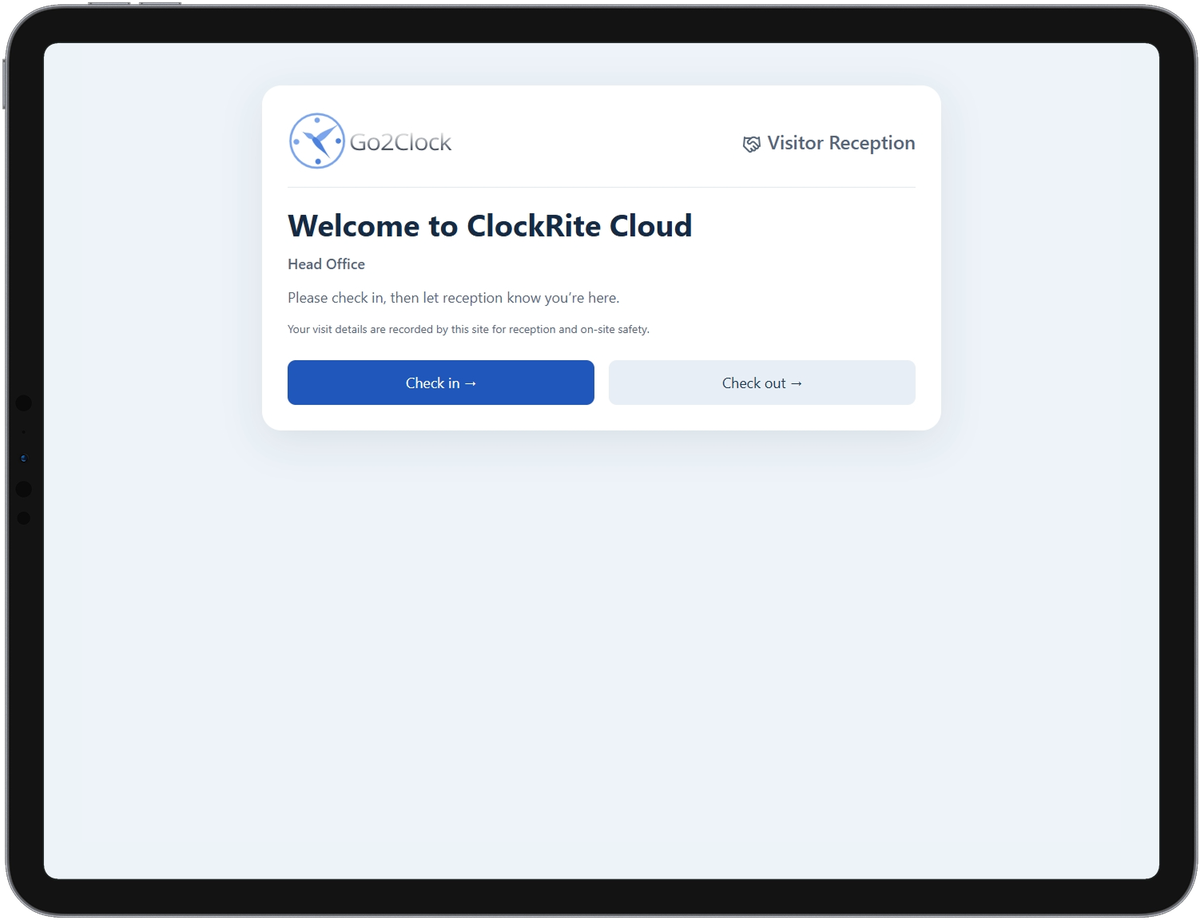
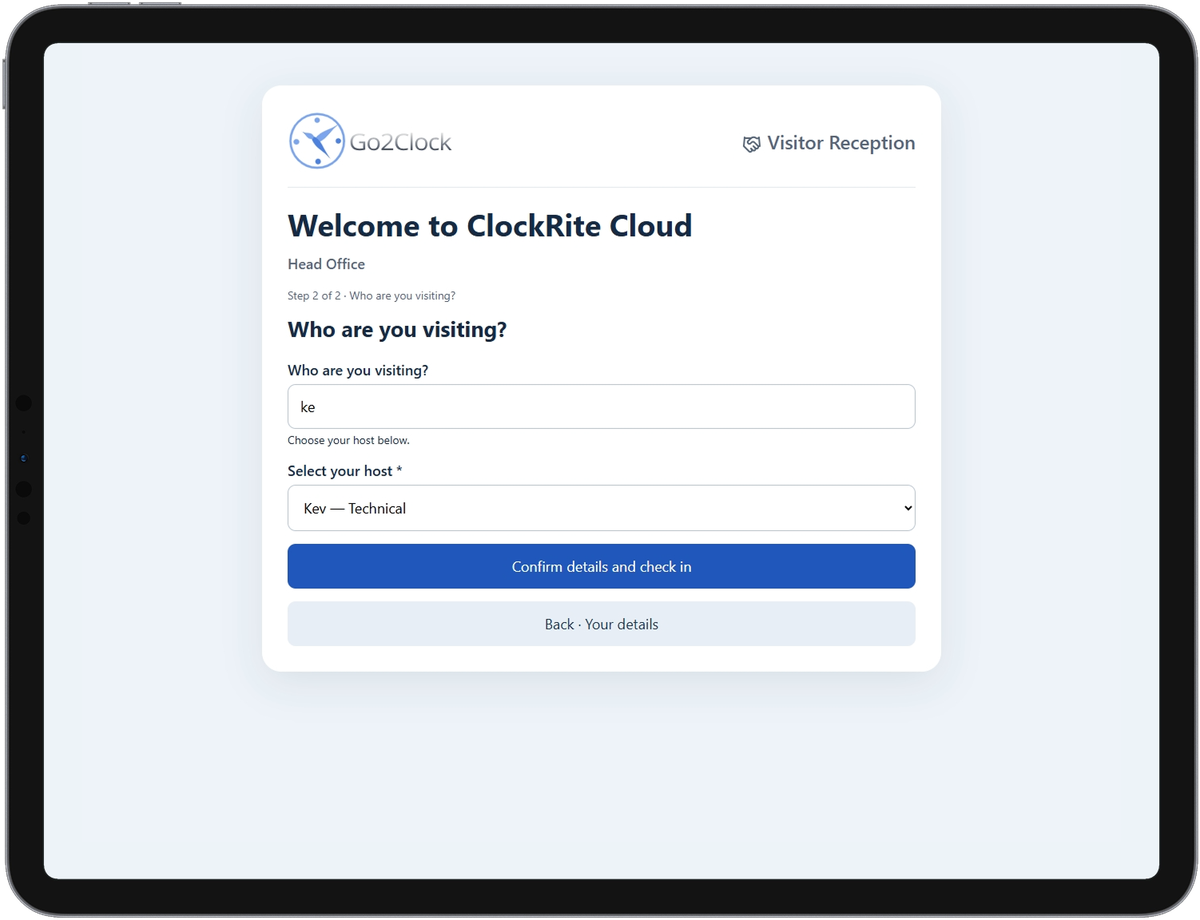
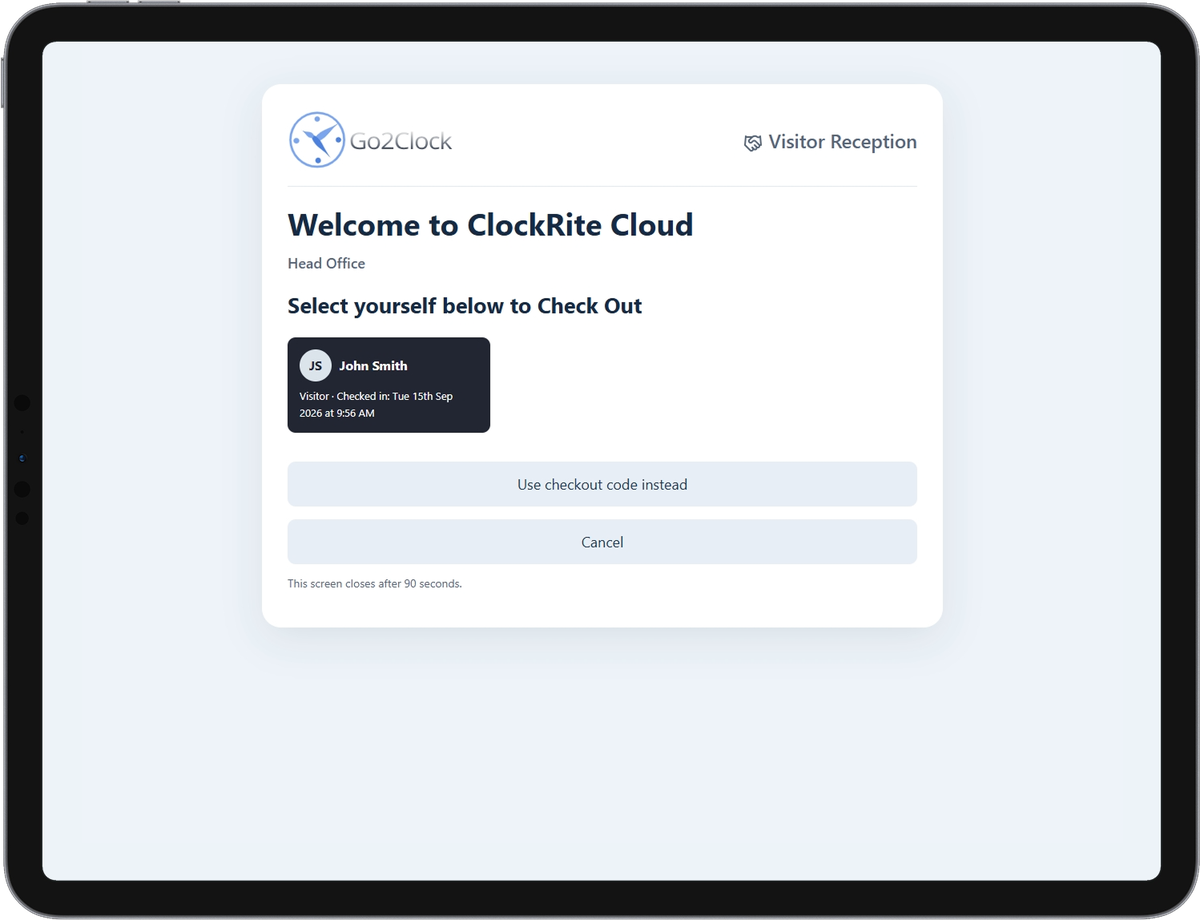
The kiosk takes each visitor through check-in in a few taps. Step through the real kiosk screens below.
1
Check in at the kiosk
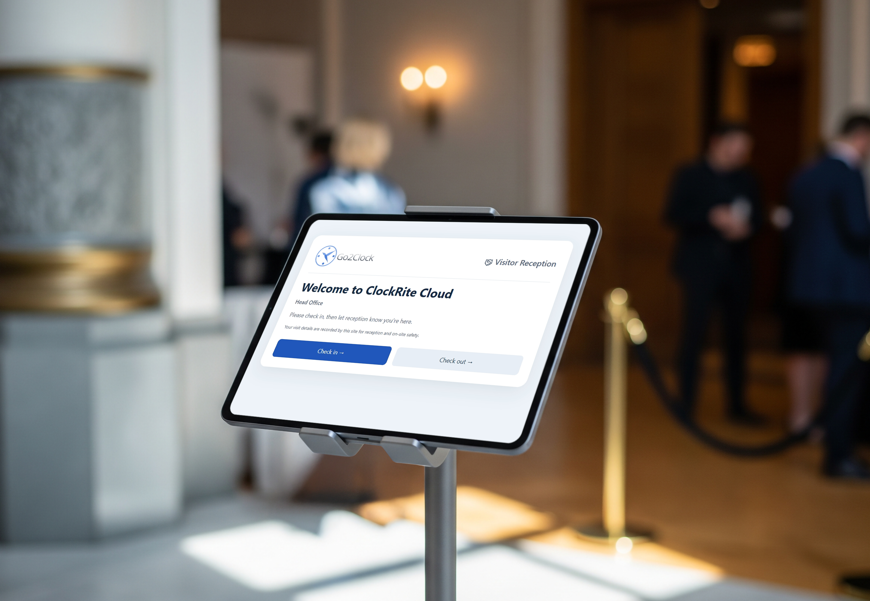
The welcome screen shows your site name, with Check in and Check out.
2
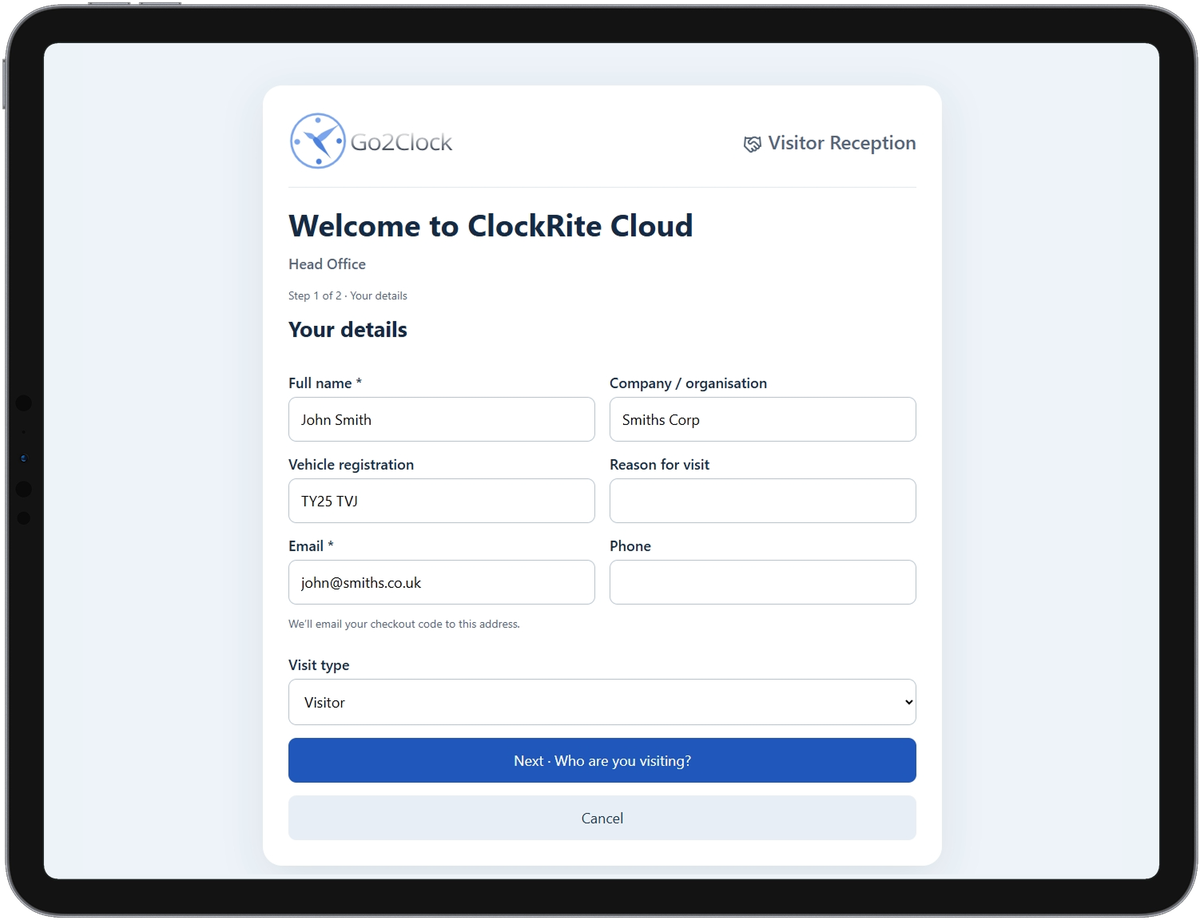
Add their details
Name and email, plus company, phone, vehicle registration, reason for visit and visit type.
3
Agree to your rules and pick a host
Visitors accept your site policies, then choose who they are seeing. That person is emailed.
4
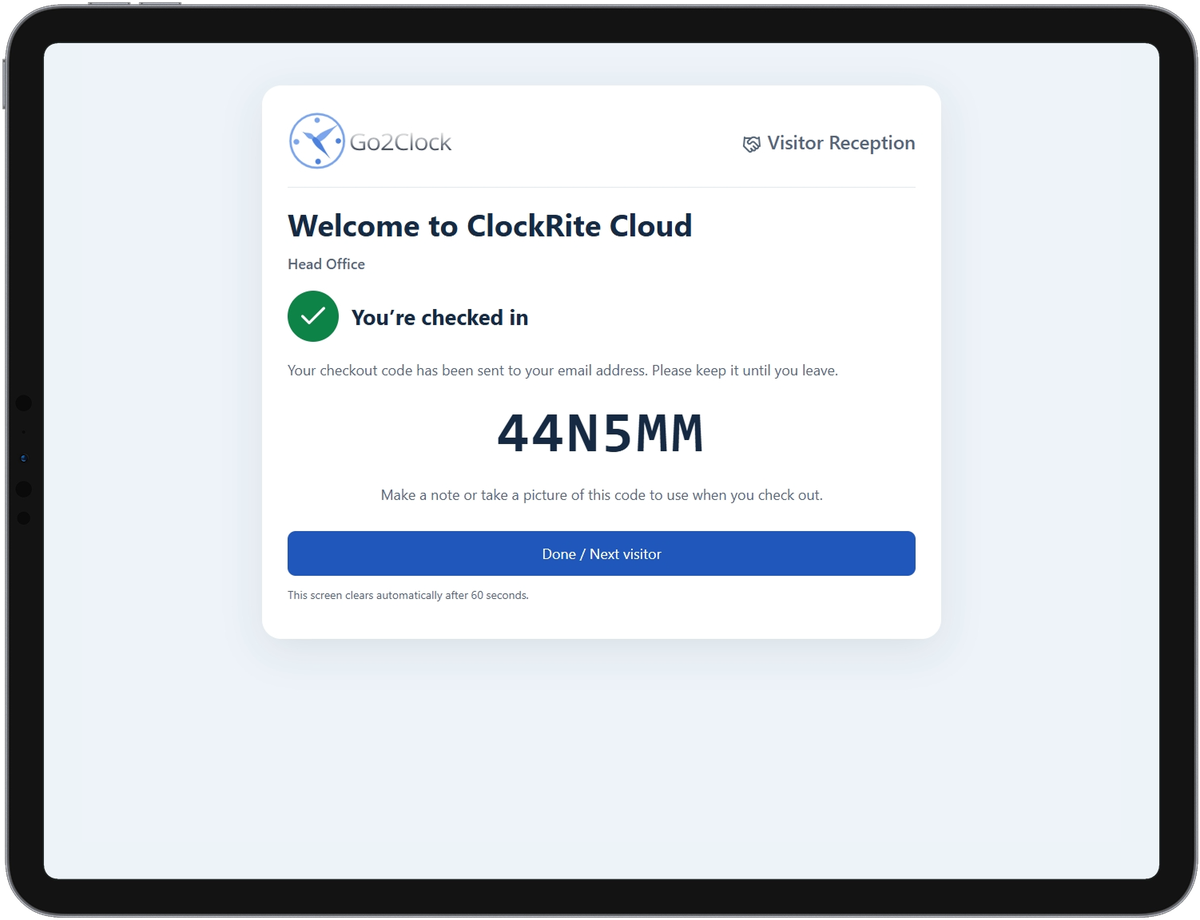
Checked in
They get a checkout code by email and appear on the live list and fire roll call.
5
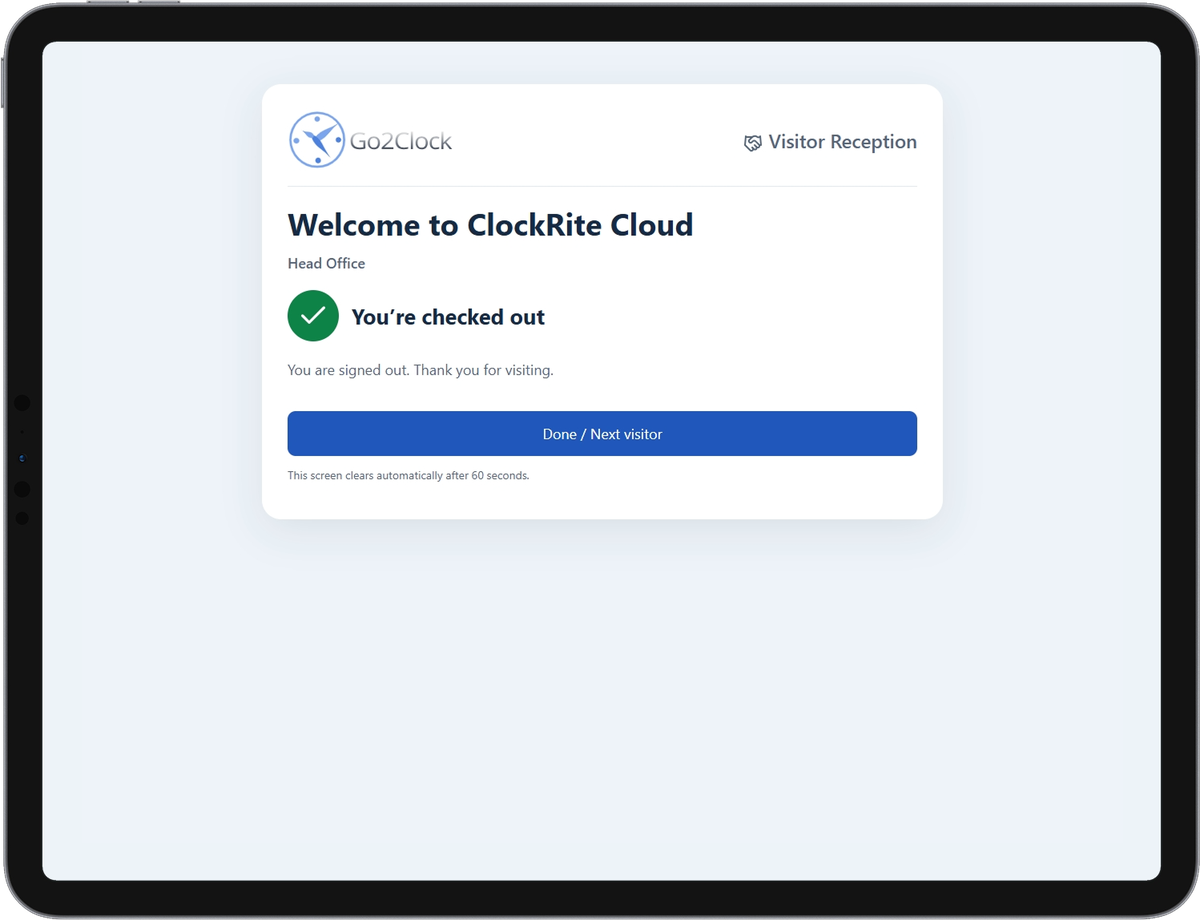
Check out
On the way out they tap their name, or enter their code, and come off the list.
Set up in minutes
As many kiosks as your sites need
Create each kiosk in ClockRite Cloud and choose the sign-in steps that suit that site. Then open its own web page on any tablet or laptop with a browser, and visitors can start checking in.
Consent at entry
Your site rules, read and agreed before anyone comes in
Put your terms and conditions, safety rules or confidentiality policy on the kiosk. Visitors scroll to the end before they can agree and carry on checking in.
Stay with your hostYour host will meet you at reception and stay with you while you are on site.
Personal protective equipmentWear the hi-vis vest and safety glasses provided in production areas.
If the fire alarm soundsLeave by the nearest exit and go to muster point A in the front car park. Do not go back for belongings.
PhotographyPlease ask your host before taking photos anywhere on site.
Before you leaveCheck out at the kiosk so we know you are off site.
- Jordan BlakeDespatchNot yet
- Kemi OkaforCare teamNot yet
- Sophie MillsOfficeNot yet
- Alex GrantVisitor · host S. MillsNot yet
- Hannah WardWorkshopNot yet
- Mo AhmedWarehouseNot yet
- Agency workerAdmin punchNot yet
Fire safety
Visitors on the roll call, not just staff
When the alarm sounds, fire marshals open one live list of every employee and visitor on site and mark people safe at the muster point. Nobody has to grab the visitor book on the way out.
Before and after
Still signing visitors in on paper?
Here is what changes when visitors check in through ClockRite.
| Area | Paper visitor book | With ClockRite |
|---|---|---|
| Signing in | Handwritten entries that can be hard to read | Visitors type their own details on the kiosk |
| Privacy | Each visitor can read the names and companies above theirs | Contact details are kept in ClockRite Cloud, not left open on the desk |
| Hosts | Reception rings round to find the host | The host is emailed as soon as their visitor checks in |
| Site rules | Rules read out, or a sheet to sign | Policies read and agreed on the kiosk before entry |
| Who is on site | Leaf through the book and hope everyone signed out | A live list of visitors on site, next to your staff |
| Fire evacuation | Someone grabs the book on the way out | Visitors are on the live fire roll call |
Visit types
Everyone who comes through the door
Each visitor chooses a visit type, so you can see at a glance who is a guest, who is working on site and who is dropping off.
Visitors
Customers, suppliers and guests meeting someone on site.
Contractors
Engineers and trades working on site, who see your safety rules before they start.
Deliveries
Drivers and couriers dropping off at goods in or reception.
Interviews
Candidates arriving for an interview, with their interviewer told they are here.
Who uses it
Visitor management for every kind of site
Why you sign visitors in depends on what happens on your site. Here is how it helps in different sectors.
Manufacturing
Engineers and contractors accept your PPE and safety rules at the kiosk before they go near production, and are counted on the fire roll call with your shifts.
Construction
Subcontractors change from one day to the next. They check in at the site cabin and agree to the site rules, so the site manager knows exactly who is on site.
Logistics and warehousing
Drivers and couriers check in at goods in without waiting for the office, and their vehicle registration and visit times are on record.
Care
Families, visiting professionals and agency workers sign in on the kiosk, so the home knows who is with residents and contact details are not left open on a desk.
Retail
Shopfitters, maintenance contractors and head office visitors are recorded when they go into stock rooms and back offices, store by store.
Hospitality
Suppliers, contractors and interview candidates check in at your hotel, pub or venue without taking staff away from guests.
It also works at an office reception or a school front desk: anywhere a tablet or laptop can sit.
Part of ClockRite Cloud
One system for staff and visitors
Visitor Management is a module of ClockRite Cloud, not another app with its own logins. Visitors share the live view and fire roll call with your staff, and our team in Chesterfield helps you set it up.
Unlimited
Kiosks and visitor profiles
UK hosted
Your Cloud data stays in the UK
12 months
UK support included as standard
Since 1999
Designing, selling and supporting clocking systems in the UK
FAQs
Visitor management questions
Can’t see yours? Call our sales team on 01246 948451 or email [email protected].
What does visitor management software cost?
Visitor Management is £300 a year + VAT. That includes unlimited kiosks and unlimited visitor profiles. It is a module for ClockRite Cloud, so you need a ClockRite Cloud account as well.
How is this different from a standalone sign in app?
A standalone app signs visitors in and that is where it stops. Visitor Management runs inside ClockRite Cloud, the same system your staff clock in to, so visitors and employees are on one live list and one fire roll call. There is no second system to log in to or keep up to date.
Is a visitor sign in book a legal requirement in the UK?
There is no UK law that says you must keep a visitor book. Fire safety law does expect you to have an evacuation plan, and your fire risk assessment should cover how you account for everyone on site, visitors included. Signing visitors in and out is the usual way to do that.
Are paper visitor books a GDPR problem?
They can be. Each visitor can read the names, companies, car registrations and phone numbers of everyone who signed in before them, and old books tend to sit in a drawer for years. A digital kiosk keeps each visitor’s details private and stores them in one place you control. A paper book may not break UK GDPR on its own, but a kiosk takes the risk away altogether. The ICO’s guidance sets out the principles that apply.
Can we ask visitors to agree to site rules or an NDA at sign in?
Yes. Add your site safety rules, terms and conditions or a confidentiality agreement as policies on the kiosk. Visitors have to scroll to the end of each one before they can agree and carry on checking in.
What happens if a visitor forgets to sign out?
They stay on the list of visitors on site, and on the fire roll call, until they are checked out. That is the safe way round: in an emergency it is better to look for someone who has already gone home than to miss someone who is still inside. Reception can sign them out in ClockRite Cloud, so it is worth checking the list at the end of each day.
What hardware do we need?
A tablet or laptop with a web browser. There is no specialist kiosk hardware and no app to install. Ask us about badge printing when you book a demo.
Does it work across several sites?
Yes. The kiosk runs in a web browser, so you can set one up at each site, and each kiosk shows its own site name.
Do visitors need to download an app?
No. Visitors check in on the kiosk at reception, so there is nothing for them to install.
Can we look back at past visits?
Yes. Every check-in and check-out is stored in a central visitor log, which you can search and review for audits, reports or incident investigations.
Where is visitor data kept?
Visitor details are stored in ClockRite Cloud, which is hosted in the UK.
Why use a visitor management system?
It shows you who is on your site at any moment, gives you a reliable record of every visit, makes sure visitors agree to your rules before they come in, and puts visitors on your fire roll call. It also takes routine sign-in work away from reception.