



The evac report
A live roll call, not a printed list
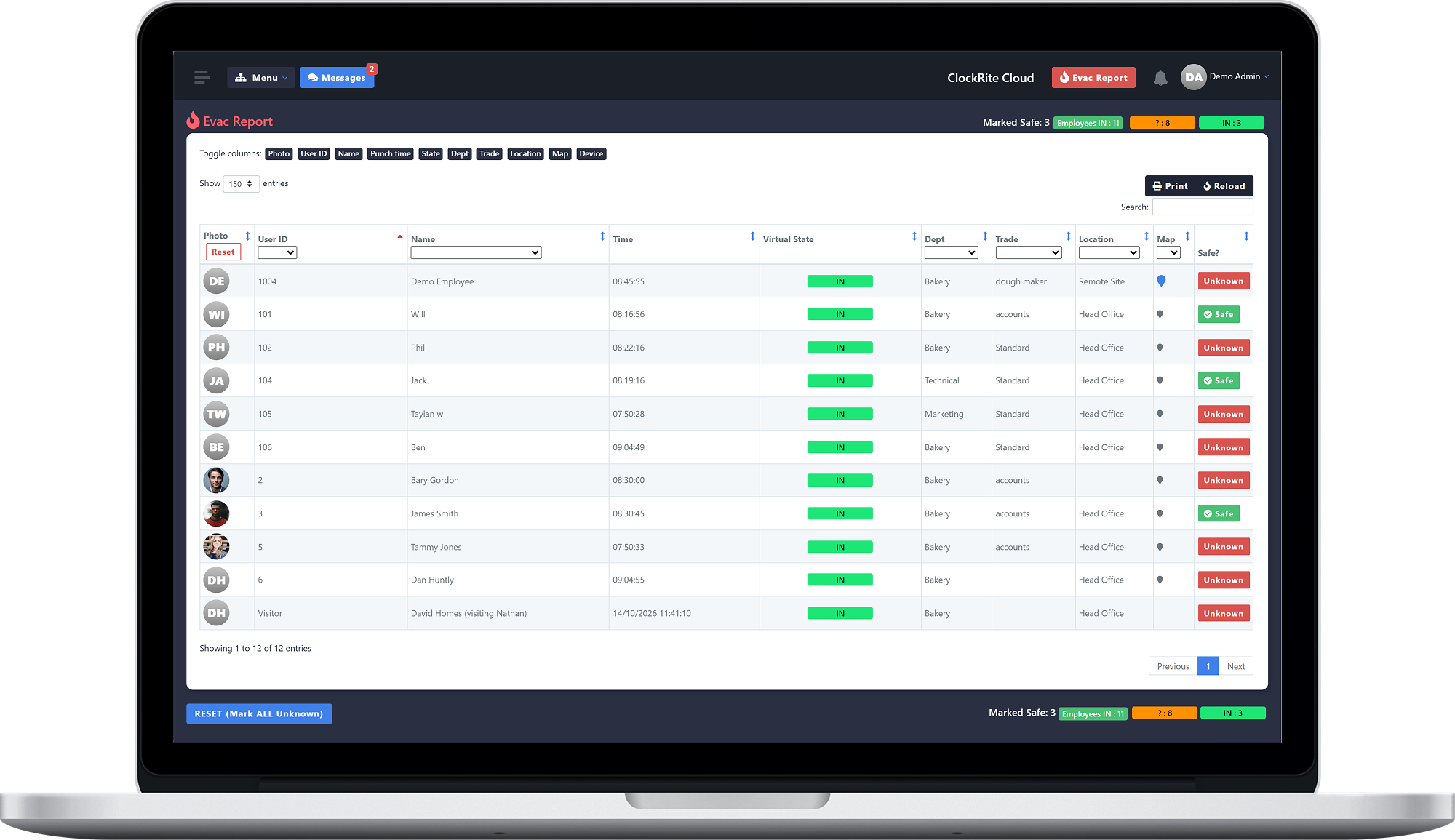
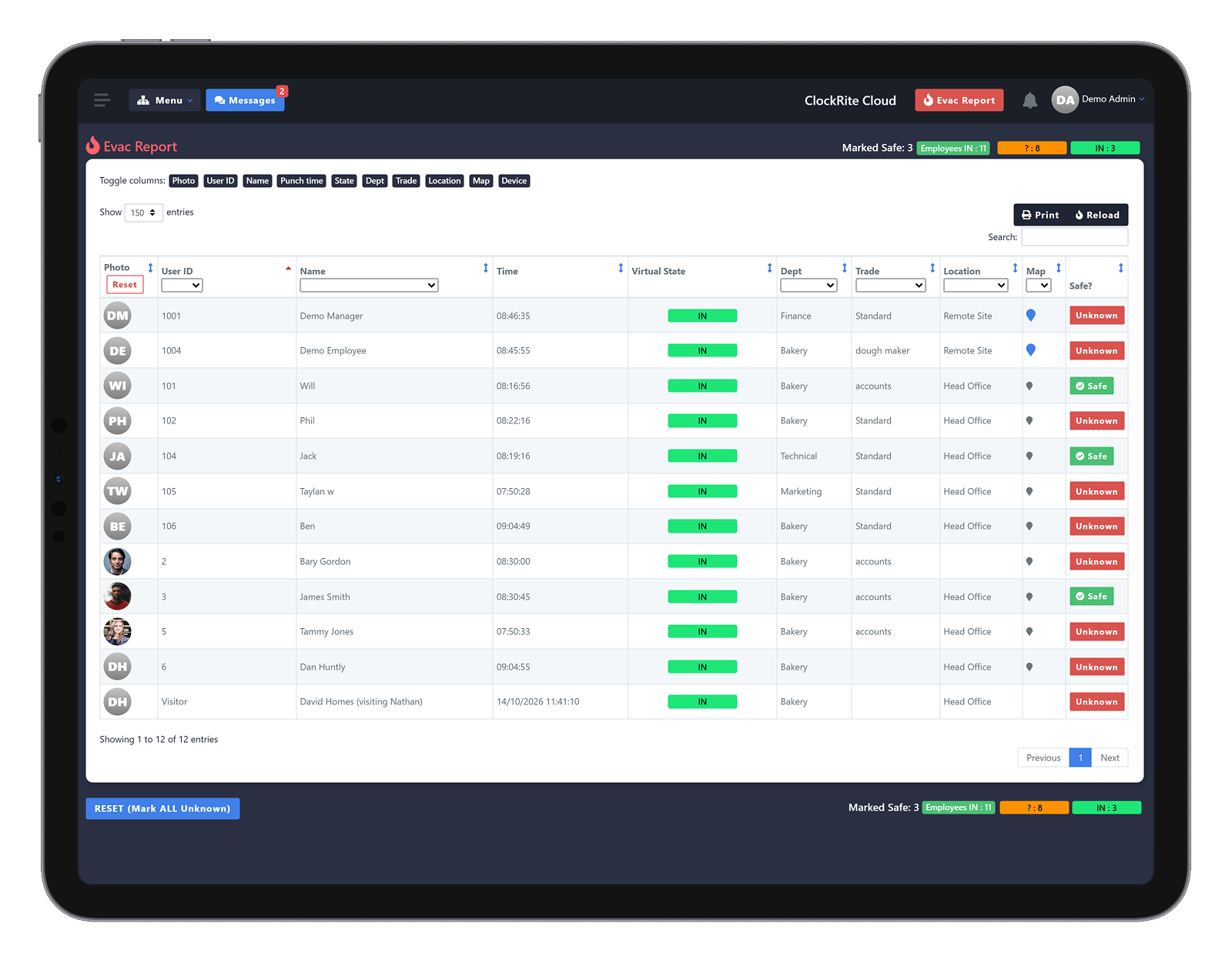
A signing-in book is only as good as the last person who remembered to fill it in. ClockRite builds your evacuation list from real clockings, door access and visitor sign-ins, so it shows who is on site right now.
Built from live data
Staff join the list when they clock in or badge through a door. Visitors join when they sign in at the kiosk.
Mark as Safe at the muster point
Marshals filter by site or department and tap Mark as Safe as each person arrives. The Marked Safe count climbs as they do.
Missing people stand out
Anyone not yet marked safe is easy to spot, with their department, location and clock-in time to show where to look.
How it works
From the alarm to the all clear
Fire roll call runs on the clockings you already collect, so there is nothing extra for staff to do on the day. Marshals need a phone, tablet or laptop with a web browser, and they can learn it in minutes.
1
People clock in and sign in
Staff clock in at a terminal, on their phone or in a browser, door access readers record who comes in, and visitors sign in at the kiosk. Each one joins the live list for their site.
2
The alarm sounds
A fire marshal or manager opens the Evac Report from the red button at the top of ClockRite Cloud, on whatever device they have to hand.
3
Mark people safe
At the muster point each marshal marks people safe as they arrive, all on the same live list. The counters show how many are safe and how many are still in.
4
Find who is missing
Anyone still showing as Unknown needs checking. Their department, location and clock-in time tell you where they were last.
5
Reset for next time
Print the report for your records, then reset everyone to Unknown, ready for the next drill or evacuation.
One connected system
Connected to the systems you already use
Fire roll call builds its list from the rest of ClockRite, so there is nothing to type in and no out-of-date register to trust. One live record of who is on site.
Time tracking
Staff join the list the moment they clock in at a terminal, on their phone or in a browser.
Door access control
ClockRite door access readers record who comes through the door, so the people who badge in are on the list too.
Visitor management
Visitors and contractors join the list when they sign in at the kiosk, and stay on it until they check out or reception signs them out.
Be prepared
How prepared are you for the unexpected?
Evacuations rarely go to plan. These are the questions worth answering before the alarm sounds.
Your usual fire marshal is off
Anyone with admin permissions, or anyone you have given access to the Roll Call Report, can log in and run it. You can give people the roll call and nothing else.
A phone or tablet fails
The roll call isn’t tied to one device. If a marshal’s phone is lost, damaged or flat, they log in on any other phone, tablet or laptop with a web browser and carry on.
Marshals are at different muster points
Several marshals can mark people safe at the same time from their own phones. Every update shows on everyone’s list straight away.
You run more than one site
Choose the location when you run the report to see one site, or filter by department to split the list between marshals.

At the muster point
Confidence when it matters most
Fire marshals and site managers get live access to staff and visitor attendance through a secure web portal. At the muster point they mark people safe, see who has arrived and spot anyone still unaccounted for, across every site.
Visitors and contractors
Visitors on the same list as your staff
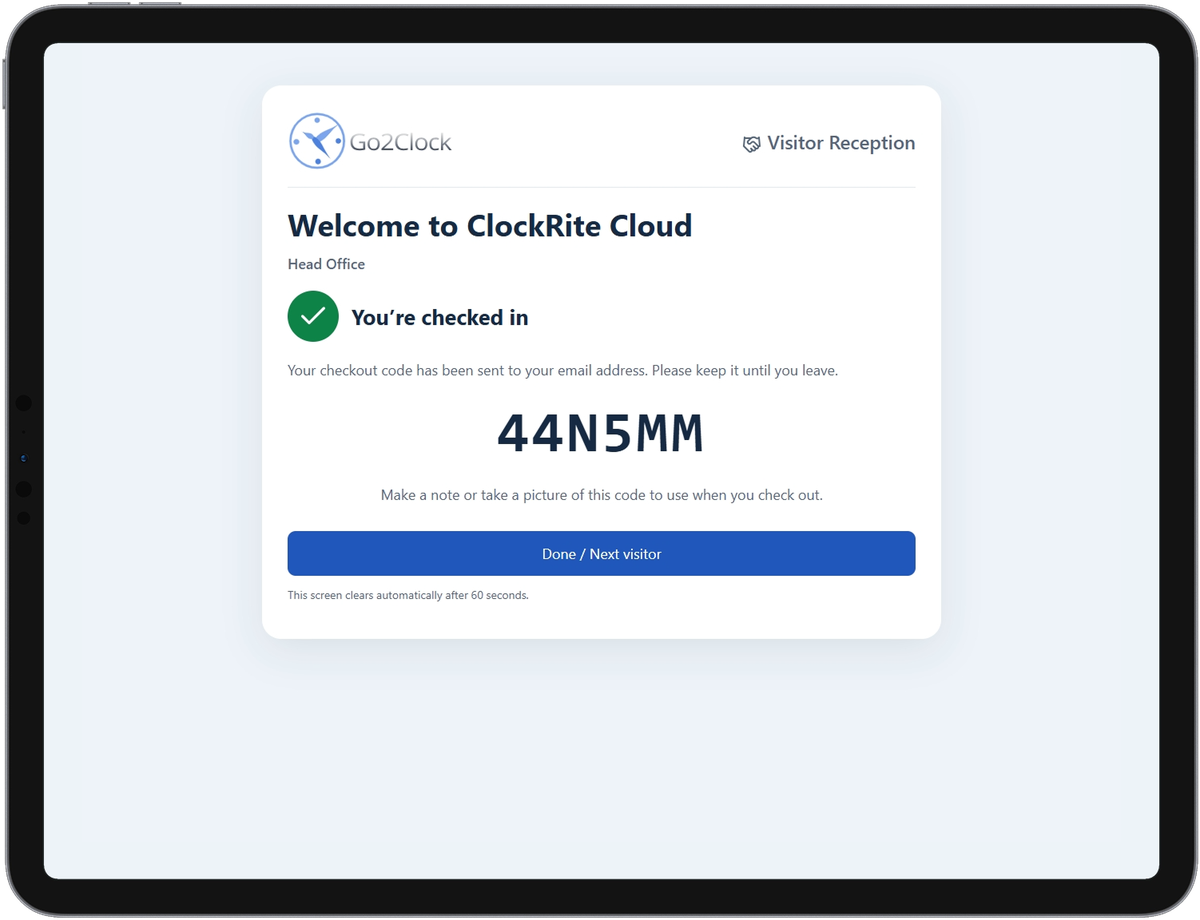
With the Visitor Management module, visitors sign themselves in at a tablet kiosk. From that moment they are on the fire roll call alongside your employees, and they stay on it until they check out or reception signs them out.
Emergency roles
Know which fire wardens and first aiders are in
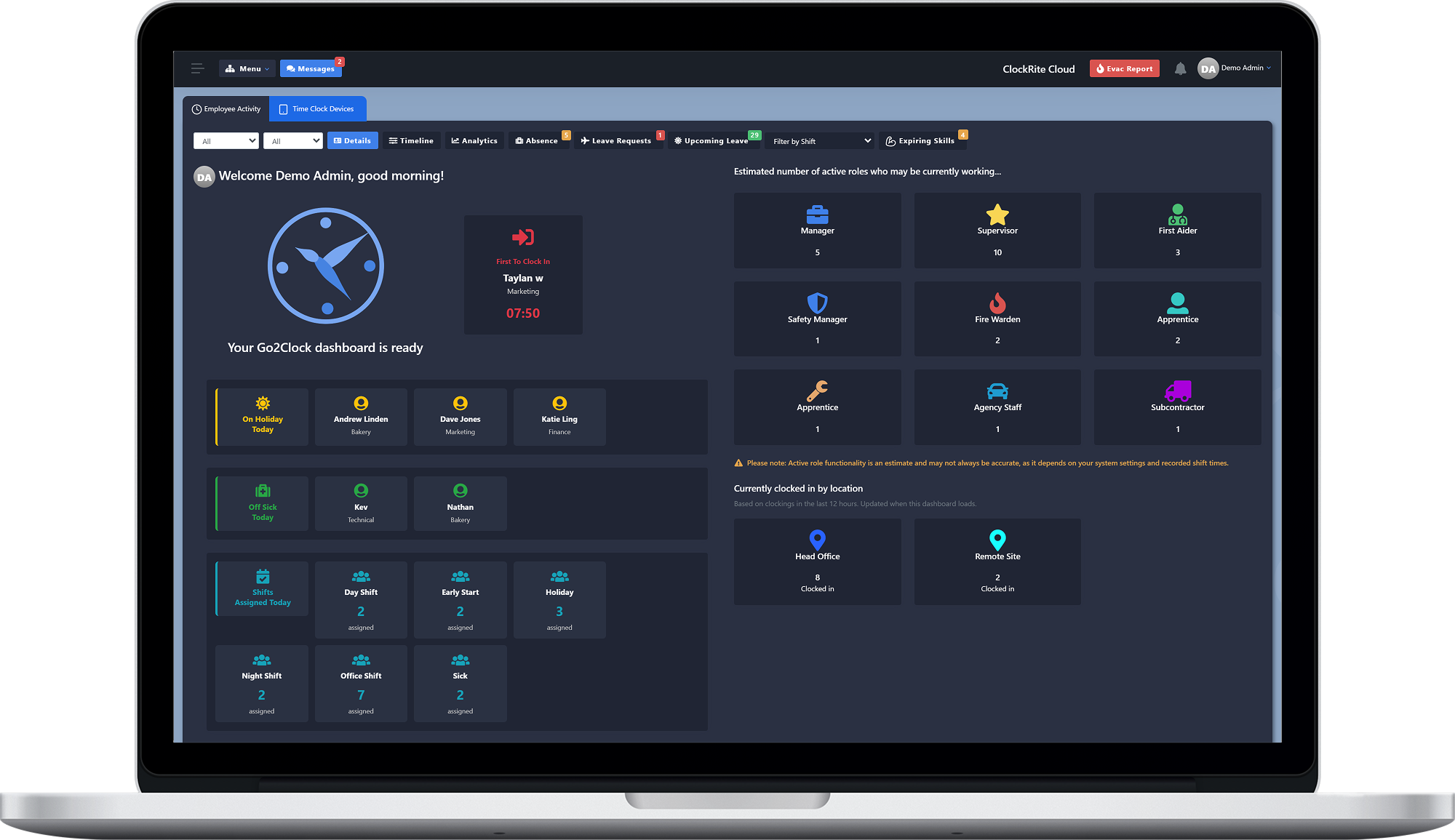
Record each person’s emergency roles and training in ClockRite Cloud. The dashboard then estimates how many fire wardens, first aiders and safety managers may be working, from their clockings and shift times.
Paper or live
Still relying on the signing-in book?
With paper, someone has to find the register or wait for a printer, tick names off with a pen and compare lists afterwards, at the worst possible moment. Here is what changes with ClockRite.
| Area | Without a system | With ClockRite |
|---|---|---|
| Getting the list | Find the register or print a report, and hope it is the right one | Open the live list on any phone, tablet or laptop |
| Who is on site | Whoever signed the book, if they remembered | Built from clockings, door access and visitor sign-ins |
| At the muster point | Names read out and ticked off with a pen | One tap marks each person safe |
| Several marshals | Separate lists compared afterwards to find the gaps | One list, updated by every marshal at once |
| Finding who is missing | Lists cross-checked by hand | Everyone not yet marked safe stands out |
| Visitors | A separate visitors’ book, if someone grabbed it | On the same list as your staff |
| Several sites | A different register at every site | Every site in one account, filtered by location |
| If the marshal is away | The register goes with whoever has it | Anyone with access can log in and run the report |
Who uses it
Fire roll call for every kind of site
Anywhere people clock in, you need to know who is inside when the alarm sounds.
Manufacturing
Shift workers, engineers and contractors on production floors, all on one list when the alarm sounds.
Construction
Subcontractors change from day to day. The list shows who is on site today, not who was booked.
Logistics and warehousing
Drivers, agency staff and pickers across large buildings and yards, split by area for each marshal.
Care
Day and night teams and agency workers, so you know which staff are on duty when you evacuate.
Retail
Store teams, stock room staff and contractors, with every store’s roll call in one account.
Hospitality
Part-time and shift staff in hotels, pubs and venues, with rotas that change every week.
It works just as well in offices, schools and multi-site groups.
Why ClockRite
Built by listening to the people who use it
Fire roll call is included free as standard with every ClockRite Cloud system. More than 5,000 businesses trust ClockRite, and we have helped UK businesses with attendance and workforce management since 1999. Our fire roll call was shaped by what customers told us they needed on the day, so you can be confident your workforce is accounted for when it matters most.
5,000+
Businesses trust ClockRite
55+ years
Combined experience of our current team
Since 1999
Helping UK businesses with time and attendance
UK based
Support team and UK hosted software
4.8
Average rating on Google reviews
Free
Included as standard with every ClockRite Cloud system
FAQs
Fire roll call questions
Can’t see yours? Call our sales team on 01246 948451 or email [email protected].
Is it easy to set up?
Yes. Add your staff as users in ClockRite Cloud and register them on your clocking terminal. Once they clock in, they appear on the fire roll call.
Do we need the full workforce management system?
No. Fire roll call is included free as standard with every ClockRite Cloud system, and it can also be bought on its own, without the rest of ClockRite’s workforce management. Staff still clock in and out, so the roll call knows who is on site. Add the Visitor Management module to put visitors on the same list.
Who can run the fire roll call?
Anyone with admin permissions, or anyone you give access to the Roll Call Report. Access is flexible: people can view the data only, or create and edit it as well.
Can several marshals use it at the same time?
Yes. Fire marshals and managers can mark people safe at the same time from their own phones or browsers. Every update shows on everyone’s screen straight away, so the roll call finishes sooner.
What devices can we use?
Any phone, tablet, laptop or PC with a web browser and an internet connection. Nothing needs installing.
Can one system cover several sites?
Yes. Choose the location when you run the report to focus on one site, or filter by department.
Can we use it for fire drills?
Yes. Run the Evac Report during a drill exactly as you would in a real evacuation, print it if you want a copy, then reset everyone to Unknown.
What if someone forgets to clock out?
They stay on the list until a marshal marks them safe, so nobody is assumed to have left. Check on them, mark them safe once you know, and remind them to clock out next time.
Where is the data hosted?
On Amazon Web Services (AWS) servers in London, in the UK. Read our GDPR FAQ for more.
Is a digital fire roll call system legally acceptable in the UK?
Yes. The Regulatory Reform (Fire Safety) Order 2005 asks for evacuation procedures that work. It does not say how you must account for people, and nothing in it requires a paper list. What counts is that your fire risk assessment sets out the method, your marshals are trained to use it, and you have a record afterwards. A printed ClockRite roll call report gives you that record without anyone having to file a signed sheet.
Does a digital roll call replace our fire risk assessment?
No. It supports the evacuation procedure in your fire risk assessment by showing who is on site and who is safe. Keep running drills and reviewing your procedure as you do today.